
· SG HIRSCHI
Performance Data (riro.de)
Summary
Every year in Switzerland, 12 races are held with homing pigeons. By analyzing the flight times and distances from the release points to each pigeon’s home loft, the average speed for each pigeon can be calculated. One-third of the participating pigeons are listed («prizes»). The results (including speeds, points, etc.) of these races are made available on RIRO (http://www.bas-riro.de/).
Using Python scripts and regular expressions (GitHub), the performance data of the homing pigeons can be imported into a database (here, MySQL), aggregated, and then formatted as HTML. This provides breeders with a practical overview of their pigeons‘ results.
Implementation
Database
The data model is designed to be as simple as possible. While the data could be highly normalized and typed, this would be excessive for the ultimate goal of a results page in HTML5 / JavaScript / CSS. Therefore, in this case, only two tables were created in a MySQL database:
- 2022_Flugsaison
- The results for the pigeons (ranks, points, speed, etc.) per flight, along with aggregated information (number of breeders, number of pigeons, etc.).
- 2022_Eingesetzte_Tauben
- Here, it should be visible for each flight which pigeons were still or again used.
The following statements can be used to create the tables:
CREATE TABLE `2022_Flugsaison` (
  `id` bigint unsigned NOT NULL AUTO_INCREMENT,
  `taubennr` varchar(255) NOT NULL,
  `mmin` varchar(255) NOT NULL,
  `prs_fg` varchar(255) DEFAULT NULL,
  `prs_rv` varchar(255) DEFAULT NULL,
  `aspkt_fg` varchar(255) DEFAULT NULL,
  `aspkt_rv` varchar(255) DEFAULT NULL,
  `insert_dttm` datetime NOT NULL DEFAULT CURRENT_TIMESTAMP,
  `km` varchar(255) NOT NULL,
  `prs` varchar(255) NOT NULL,
  `auflassort` varchar(255) NOT NULL,
  `prs_zt` varchar(255) NOT NULL,
  `flugnummer` varchar(255) NOT NULL,
  `prs_tb` varchar(255) DEFAULT NULL,
  `flugdatum` date DEFAULT NULL,
  `anz_ztr_fg` varchar(255) DEFAULT NULL,
  `anz_ztr_rv` varchar(255) DEFAULT NULL,
  `anz_tbn_fg` varchar(255) DEFAULT NULL,
  `anz_tbn_rv` varchar(255) DEFAULT NULL,
  `prs_rg` varchar(255) DEFAULT NULL,
  `anz_tbn_rg` varchar(255) DEFAULT NULL,
  `anz_ztr_rg` varchar(255) DEFAULT NULL,
  `aspkt_rg` varchar(255) DEFAULT NULL,
  PRIMARY KEY (`id`),
  UNIQUE KEY `id` (`id`)
) ENGINE=InnoDB AUTO_INCREMENT=917 DEFAULT CHARSET=utf8mb4 COLLATE=utf8mb4_0900_ai_ci;
CREATE TABLE `2022_Eingesetzte_Tauben` (
`id` int NOT NULL AUTO_INCREMENT,
`taubennr` varchar(255) NOT NULL,
`flugnummer` varchar(255) NOT NULL,
`insert_dttm` datetime NOT NULL DEFAULT CURRENT_TIMESTAMP,
PRIMARY KEY (`id`)
) ENGINE=InnoDB AUTO_INCREMENT=297 DEFAULT CHARSET=utf8mb4 COLLATE=utf8mb4_0900_ai_ci;Data Sources
For this project, two sources may be of interest:
- Performance data from http://www.bas-riro.de/
- Data from TIPES device https://tipes.de/
Unfortunately, the ranking data is very heterogeneous, varying by racing association, country, and sometimes even by flight. For example, this can occur when certain flights are conducted with other racing associations, resulting in an overall ranking list at the end.
The data from the Tipes device includes the registered arrival times for each pigeon and serves as the basis for creating the overall rankings. Fortunately, this data is always formatted consistently.
Data Processing
Method
To read the sometimes heterogeneous text data consistently and generically, regular expressions are used. By defining a set of syntactic rules that are recognized and extracted from the data, individual text components can be parsed based on specific delimiters (e.g., spaces). Since certain text components may not always be present, they can be declared as «optional» in the syntactic rules.
On the website https://regex101.com/, you can create, check, validate, and test these rules.
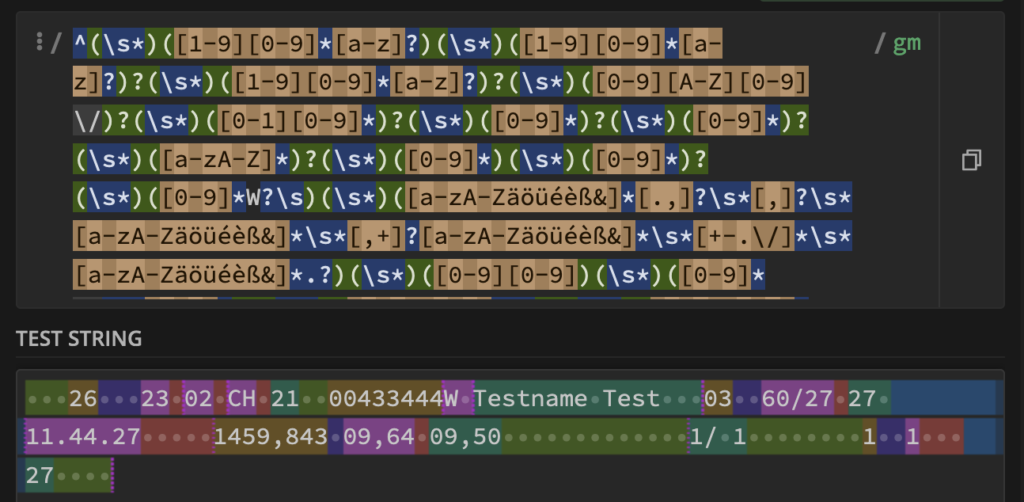
The individual color-coded components can subsequently be easily used in virtually any programming language.
Reading the TIPES Data
The data from the Tipes devices not only includes arrival times but also lists every pigeon that was entered in the flight. This provides a good basis for the statistics to show whether the pigeon was actually entered in the respective flight. Below is an example:
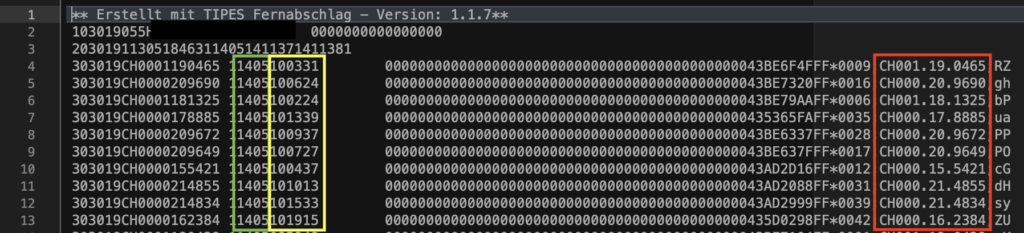
For this specific format, the following regular expression has proven to be helpful:
^([0-9][0-9][0-9][0-9])([1-9][0-9])([A-Z][A-Z]?)\s*(0*)([1-9][0-9]*w?)\s*([0-9]*)\s*([0-9A-Z]*)(\*)([0-9]*;)([A-Z][A-Z]?)([0-9]*).([1-9][0-9]).([0-9]*w?);([a-zA-Z0-9.]*)$The detailed instructions for processing can be found in the public GitHub repository.
Read Performance Data (riro)
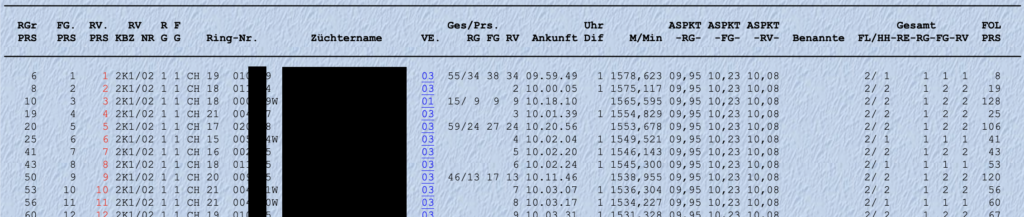
For this format, the following regular expression has proven to be useful:
^(\s*)([1-9][0-9]*[a-z]?)(\s*)([1-9][0-9]*[a-z]?)?(\s*)([1-9][0-9]*[a-z]?)?(\s*)([0-9][A-Z][0-9]\/)?(\s*)([0-1][0-9]*)?(\s*)([0-9]*)?(\s*)([0-9]*)?(\s*)([a-zA-Z]*)?(\s*)([0-9]*)(\s*)([0-9]*)?(\s*)([0-9]*W?\s)(\s*)([a-zA-Zäöüéèß&]*[.,]?\s*[,]?\s*[a-zA-Zäöüéèß&]*\s*[,+]?[a-zA-Zäöüéèß&]*\s*[+-.\/]*\s*[a-zA-Zäöüéèß&]*.?)(\s*)([0-9][0-9])(\s*)([0-9]*\/\s*[0-9]*)?(\s*)([0-9][0-9]?\s)?(\s*)([0-9][0-9]?\s)?(\s*)([0-9]*.[0-9]*.[0-9]*)(\s*)(-?[0-9]\s)?(\s*)([0-9]*,[0-9]*)(\s*)([0-9]*,[0-9]*)?(\s*)([0-9]*,[0-9]*)?(\s*)([0-9]*,[0-9]*)?(\s*)([A-Z])?(\s*)([0-9]*\/\s*[0-9]*)(\s*)([0-9]*)(\s*)([0-9]*,?[0-9]*)(\s*)([0-9]*)(\s*)([0-9]*)(\s*)$This enables the structured extraction of:
- Pigeon number (including nationality, sex, and year of birth)
- Ranks (regional, group, etc.)
- Ace points (regional, group, etc.)
- Speed
- Breeder’s name
- …
Detailed instructions for processing can be found in the public GitHub repository..
Data Aggregation
Now that all the necessary data has been imported into the MySQL database, it is important to visualize it in an appropriate format. For example, querying the results per pigeon and flight and aggregating them in a table can be achieved as follows:
SELECT   EING.taubennr,
         CAST(EING.flugnummer AS UNSIGNED) AS flugnummer,
         RESULTATE.prs_fg,
         RESULTATE.prs_rv,
         RESULTATE.prs_zt,
         IF(RESULTATE.aspkt_fg IS NULL OR RESULTATE.aspkt_fg='',NULL,CAST(REPLACE(RESULTATE.aspkt_fg,',','.') AS DECIMAL(4,2))) AS aspkt_fg,
         IF(RESULTATE.aspkt_rv IS NULL OR RESULTATE.aspkt_rv='',NULL,CAST(REPLACE(RESULTATE.aspkt_rv,',','.') AS DECIMAL(4,2))) AS aspkt_rv
 FROM brieftauben.`2022_Eingesetzte_Tauben` AS EING
 LEFT JOIN brieftauben.`2022_Flugsaison`	AS RESULTATE ON RESULTATE.taubennr = EING.taubennr AND RESULTATE.flugnummer = EING.flugnummer
Data Visualization
The results of the SQL query can be further transformed and aggregated as needed and then outputted as an HTML/JavaScript/CSS website, for example.
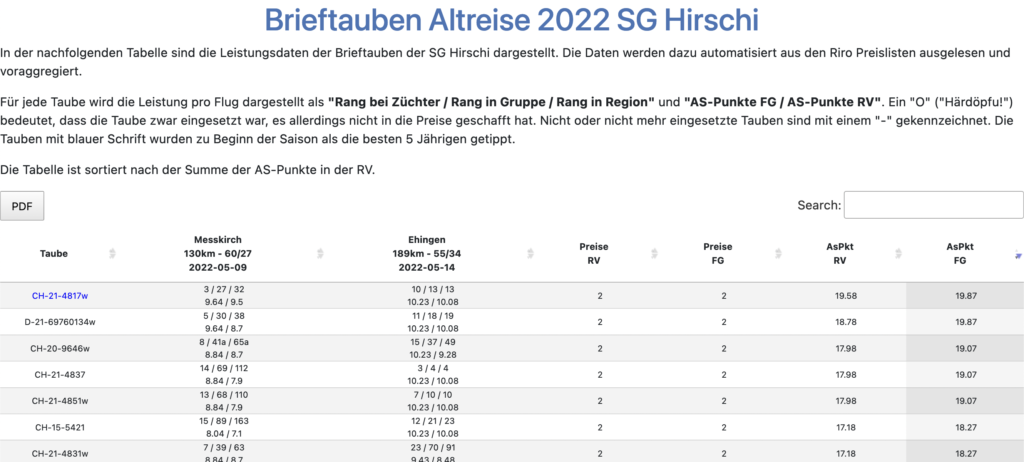
To make this printable, I have also implemented a «PDF Export» button. The output may not be beautiful, but it is functional.
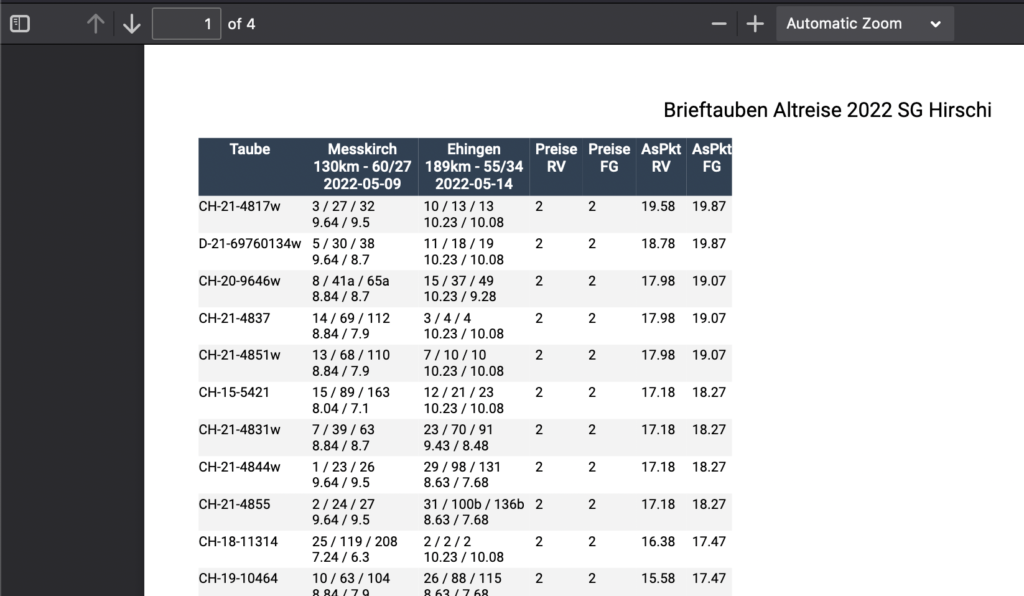
Now all the steps are complete, and you can import, process, and finally update the website with the relevant data in MySQL after each flight with just a few clicks. Examples of these websites can be found at: https://patrick-hirschi.ch/brieftauben/
Archived original article. Media credits in the article are preserved.
← Journal